Cross-Chain Swap in Admin Console

1. Introduction to Cross-Chain Bridges
A cross-chain bridge is a protocol mechanism used to transfer assets between different blockchain networks. Because various public blockchains (such as TRON, Ethereum, BSC, etc.) are independent and use incompatible protocols, assets cannot be transferred directly. Cross-chain bridges enable equivalent circulation of the same asset across different chains through mechanisms like "lock → mint" or "swap → release".
Cross-Chain Capabilities of This Platform
This admin console already has built-in cross-chain swap functionality, allowing you to complete asset transfers between major blockchains without integrating an external bridge. It works similarly to "currency exchange": select the asset to sell, choose the destination chain for the asset to buy, enter the receiving address on the counterparty chain, and confirm to complete the cross-chain transfer.
| Feature | Description |
|---|---|
| Supported Assets | USDT and other mainstream stablecoins, native coins |
| Supported Chains | TRON (TRC20)、Ethereum (ERC20)、BSC (BEP20), etc. |
| Fund Source | Hot wallet (Finance) account balance |
| Settlement Time | Typically within minutes (subject to on-chain congestion) |
| Fees | Charged by the cross-chain bridge at real-time rates (included in the swap rate) |
- Available only for Standard and Lite merchant versions
- Operator account must have "Treasurer" permissions
- Hot wallet (Finance) must have sufficient available balance
- Target chain receiving address must be prepared (verify carefully; incorrect addresses will result in irretrievable funds)
2. Operation Steps
1. Log in to Admin Console
Log in to the admin console using a "Treasurer" account.
Admin Console URL: https://adm.payprotocol.network/login
Swap operations involve fund transfers and must use an account with "Treasurer" permissions. Regular admin accounts cannot access the swap functionality.
2. Ensure Hot Wallet (Treasurer) Has Sufficient Balance
The fund source for cross-chain swaps is the "Hot Wallet (Treasurer)". If the hot wallet balance is insufficient, you need to first withdraw assets from the cold vault wallet to the hot wallet, or transfer from other external addresses to the hot wallet.
Method A: One-Click Withdrawal from Cold Vault
Go to the "Asset Details" page and click the "One-Click Withdraw" button in the top-right corner. The system will automatically withdraw the available balance from the cold vault wallet to the hot wallet.
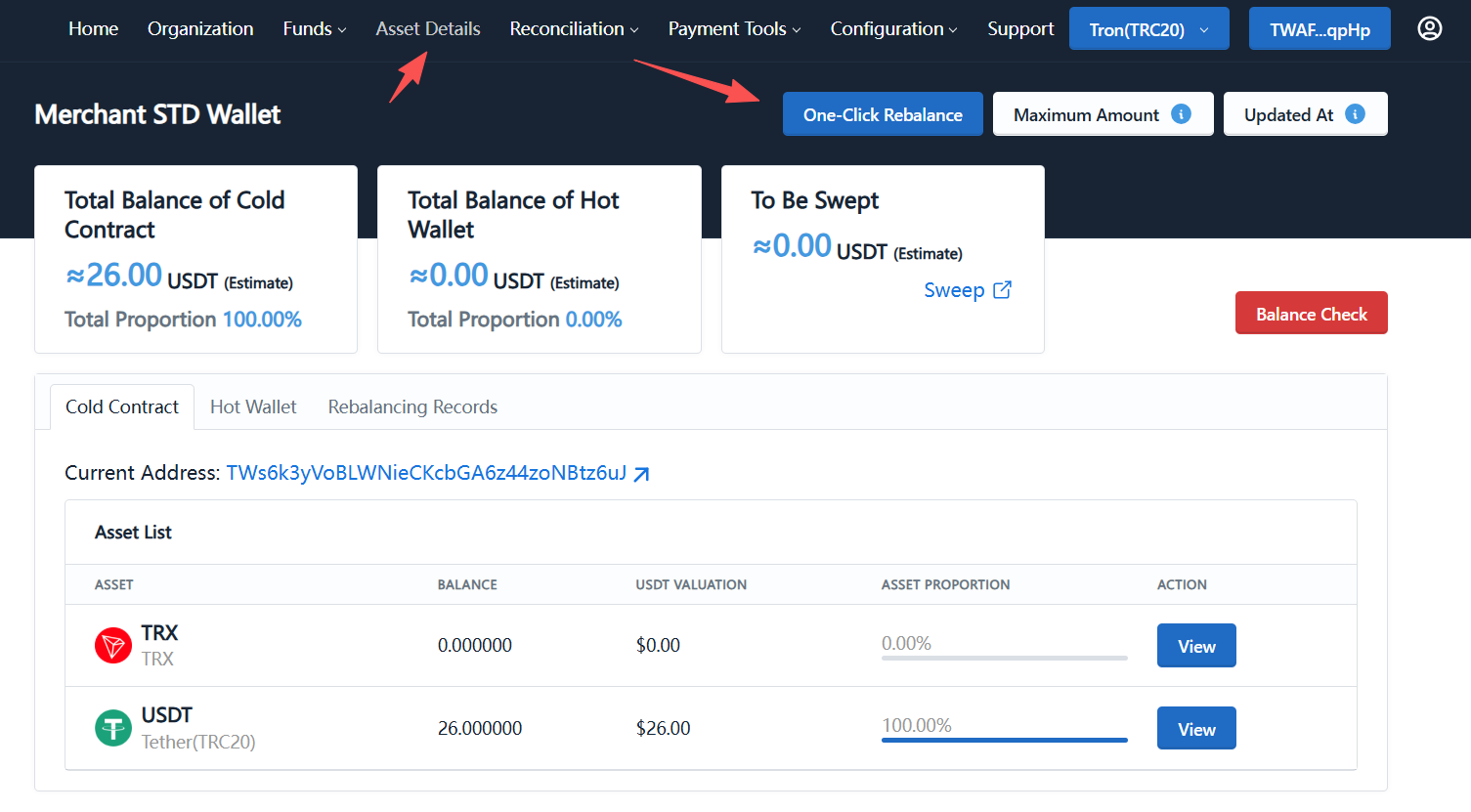
Figure 2-1: Click "One-Click Withdraw" on the "Asset Details" page
Method B: Transfer from External Address
If the cold vault also has no available balance, you can transfer directly from other addresses you own (such as exchange withdrawal, wallet transfer) to the hot wallet (Finance) address. You can find the hot wallet address in the "Asset Details → Hot Wallet" tab.
3. Enter Swap Page and Fill in Information
Click the top navigation "Fund Management → Swap" to enter the cross-chain swap page.
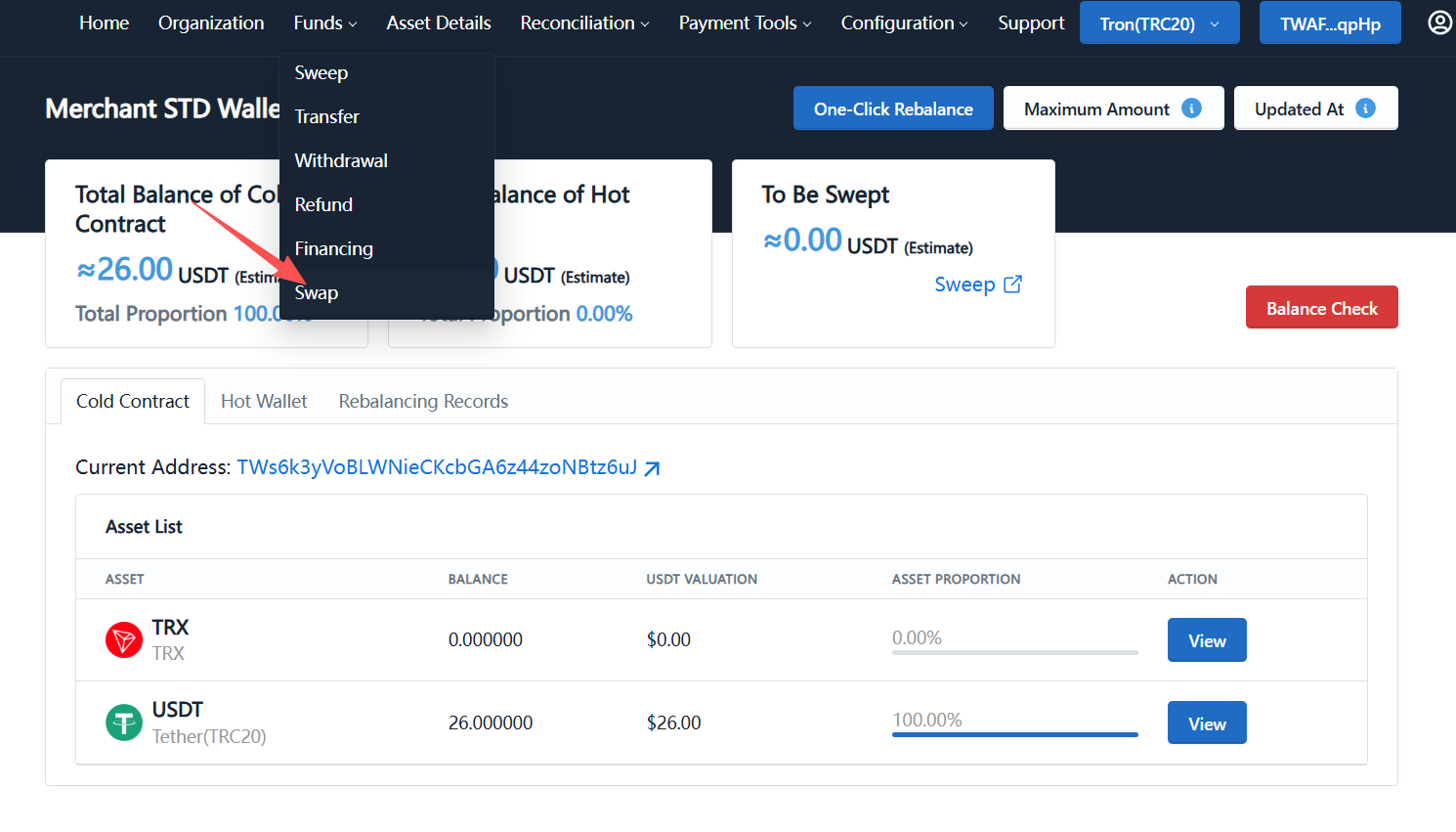
Figure 3-1: Navigate to "Fund Management → Swap"
Fill in the following information on the swap page:
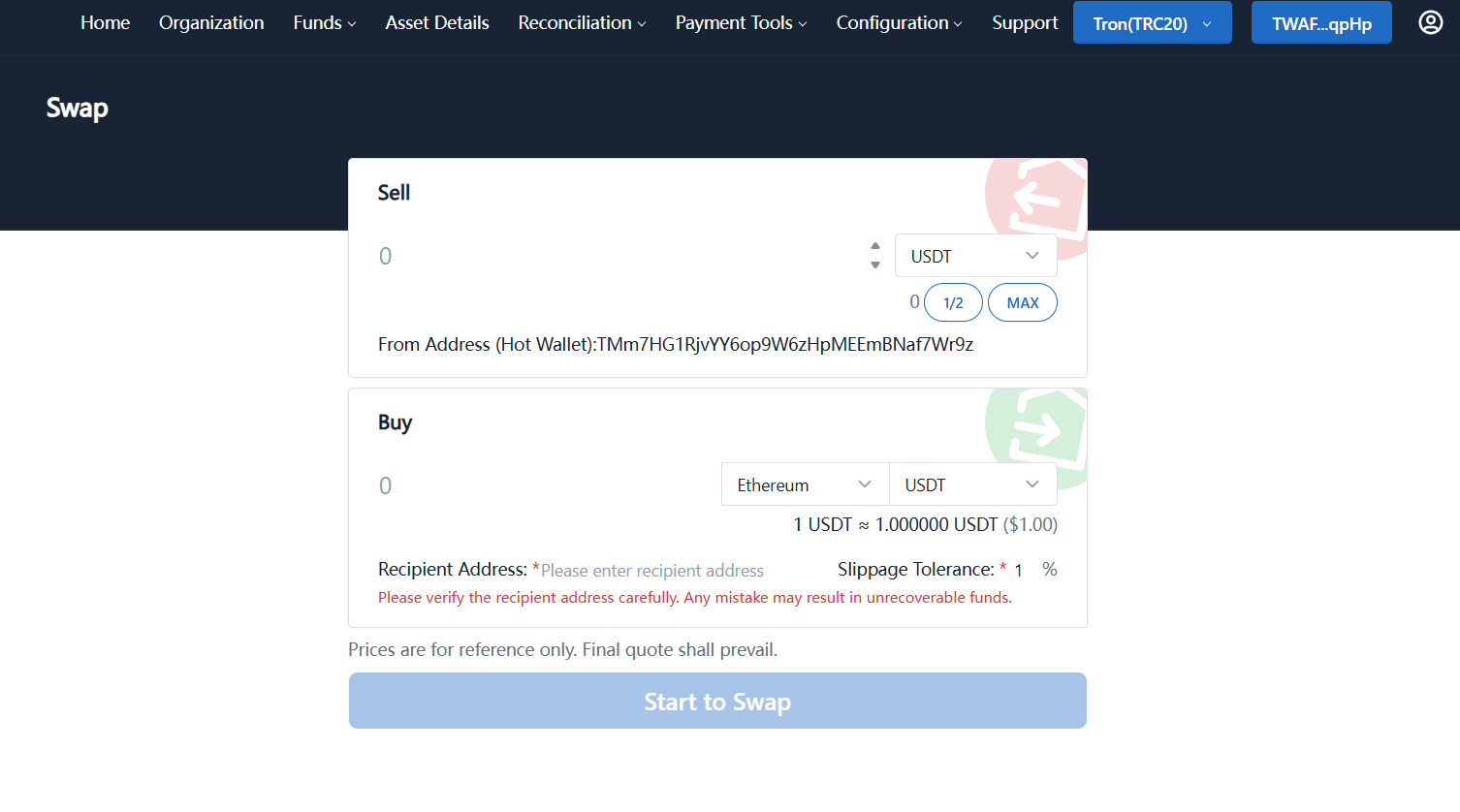
Figure 3-2: Swap form (Sell / Buy / Receiving Address)
| Field | Description | Example |
|---|---|---|
| Sell (Amount) | Quantity to swap | 100 |
| Sell (Asset) | Source chain asset, select from dropdown | USDT (TRC20) |
| Buy (Chain) | Target chain network | Ethereum |
| Buy (Asset) | Asset to receive on target chain | USDT |
| Receiving Address | Receiving address on target chain (required) | 0x... (ETH address) |
| Slippage Tolerance | Maximum acceptable price slippage | 1% |
Please verify the receiving address carefully; an incorrect address will result in irretrievable funds! For Ethereum target chain, the address should start with 0x; for TRON, it should start with T. It is recommended to copy and paste from the target wallet to avoid manual entry errors.
4. Confirm and Initiate Swap
After completing the information, the page will display a real-time quote (e.g., 1 USDT ≈ 1.000000 USDT). This quote is for reference only; the final execution rate will be the rate at the time of swap execution.
After confirming everything is correct, click the "Start Swap" button below to submit. The system will deduct the corresponding amount from the hot wallet and transfer the assets to the receiving address on the target chain via the cross-chain bridge.
- TRON ↔ Ethereum: typically 3~10 minutes
- TRON ↔ BSC: typically 1~5 minutes
- During on-chain congestion or gas anomalies, actual times may vary
5. Check Arrival Status at Target Address
After initiating the swap, you can confirm arrival using any of the following methods:
- Open the block explorer of the target chain (e.g., Etherscan, BscScan) and check the latest transaction records of the receiving address
- Open your wallet app (e.g., MetaMask, TronLink), switch to the target network and check balance changes
- Return to the admin console and check the swap transaction status in "Asset Details → Withdrawal Records"
If funds do not arrive within 30 minutes, please troubleshoot in the following order:
- Verify in the block explorer that the transaction on the source chain has been successfully confirmed
- Double-check that the receiving address you entered is correct
- If confirmed to be correct, save a screenshot of the order and contact platform technical support
3. Important Considerations
- Cross-chain swaps are irreversible; once submitted, they cannot be cancelled. Please verify the address and amount multiple times before operating
- Swaps between different assets will be settled at real-time market rates, with some slippage
- For large swaps, it is recommended to test with a small amount (e.g., 1 USDT) first, then proceed with larger amounts after confirming arrival
- Certain chain pairs (e.g., obscure small-cap assets) may have insufficient liquidity, resulting in longer settlement times or even failure
- Cross-chain bridge fees are already included in the swap rate; no additional fees apply
- Source chain transactions require on-chain gas (borne by the hot wallet account); ensure the account has a small amount of native currency (e.g., TRX)
4. Reference Materials
- Etherscan (Ethereum Explorer): https://etherscan.io
- Tronscan (TRON Explorer): https://tronscan.org
- BscScan (BSC Explorer): https://bscscan.com